Card Link Service
Terms and Conditions
Welcome to the Card Link Service offered by GCash.
- What is the Card Link Service?
The Card Link Service (“Service”) allows you to link your international or domestic Visa and/or Mastercard credit, debit or prepaid cards to your GCash wallet, enabling you to make direct payments at QRPH merchants using the funds from your linked card. - How does the Service benefit me?
With this Service, you can pay merchants directly from your linked card, without the need to cash-in to your GCash wallet. It offers a seamless, secure, and convenient way for users who prefer to use their credit or debit cards when making payments. - Who can use the Card Link Service?
The service is available to all registered, fully verified GCash users who have linked a valid international or domestic Visa or Mastercard credit or debit card to their GCash wallet. Users are strictly required to link cards that match their registered identity and provided means of identification. GCash reserves the right to unlink any card found not to match the user’s verified account details. - Can I link a credit or debit card that belongs to someone else?
No. Users are only permitted to link credit or debit cards where the cardholder's name and details match the verified means of identification provided to GCash. GCash reserves the right to automatically unlink any card or suspend the Service if a linked card is found not to match your registered identification details. - How do I link my credit/debit card to GCash?
You can link your card through the GCash App in any of the following options:
a) Via Cash In: From the dashboard, tap Cash In, then select Link Card.
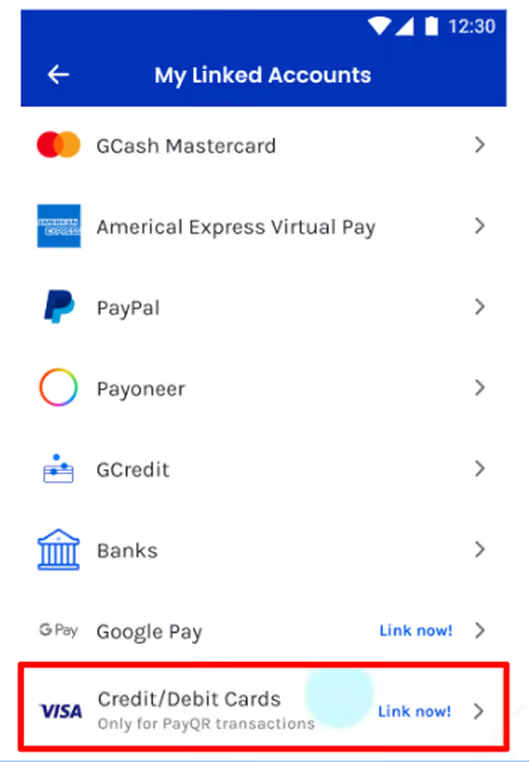
b) Via Profile: Go to Profile > Linked Accounts > Credit/Debit Card.
c) During Payment when scanning a QRPH code, tap the payment source and select Add Card.
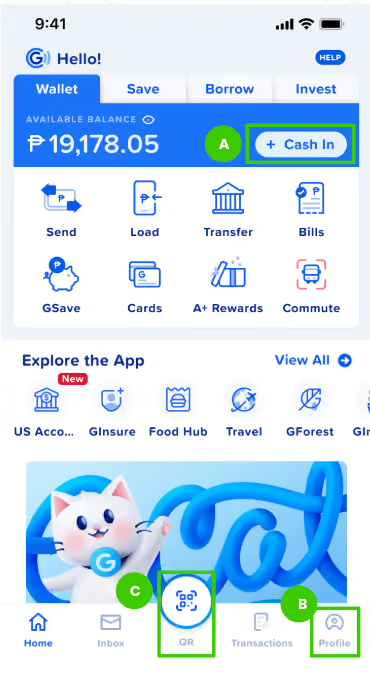
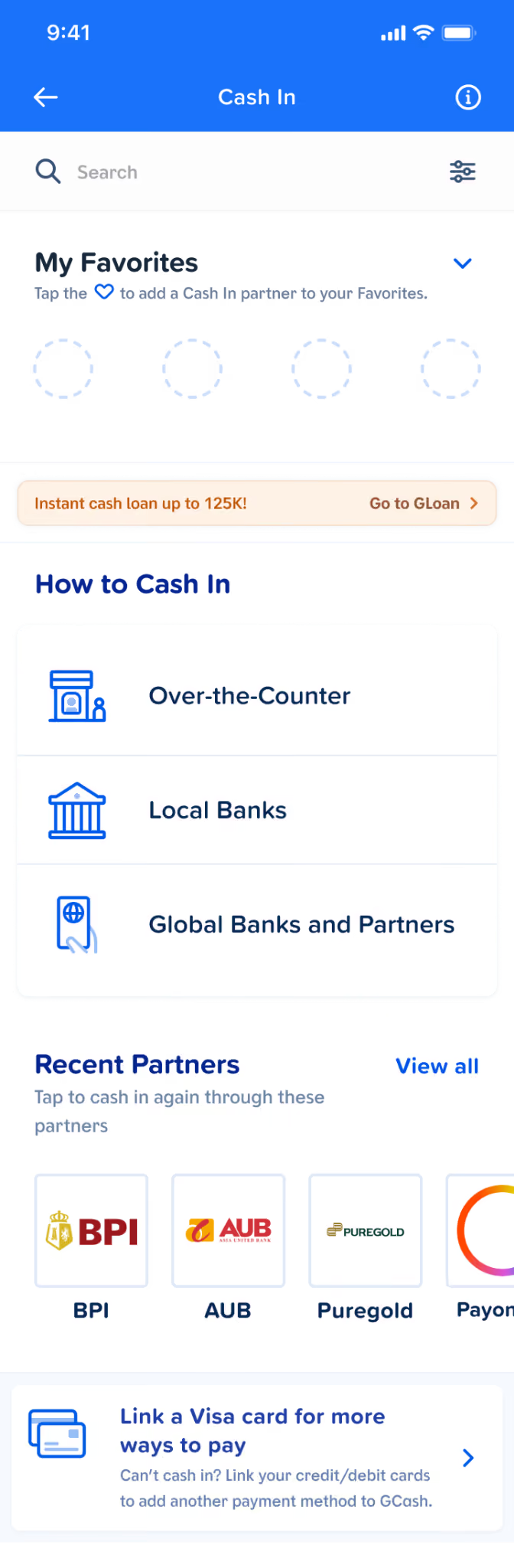
a.
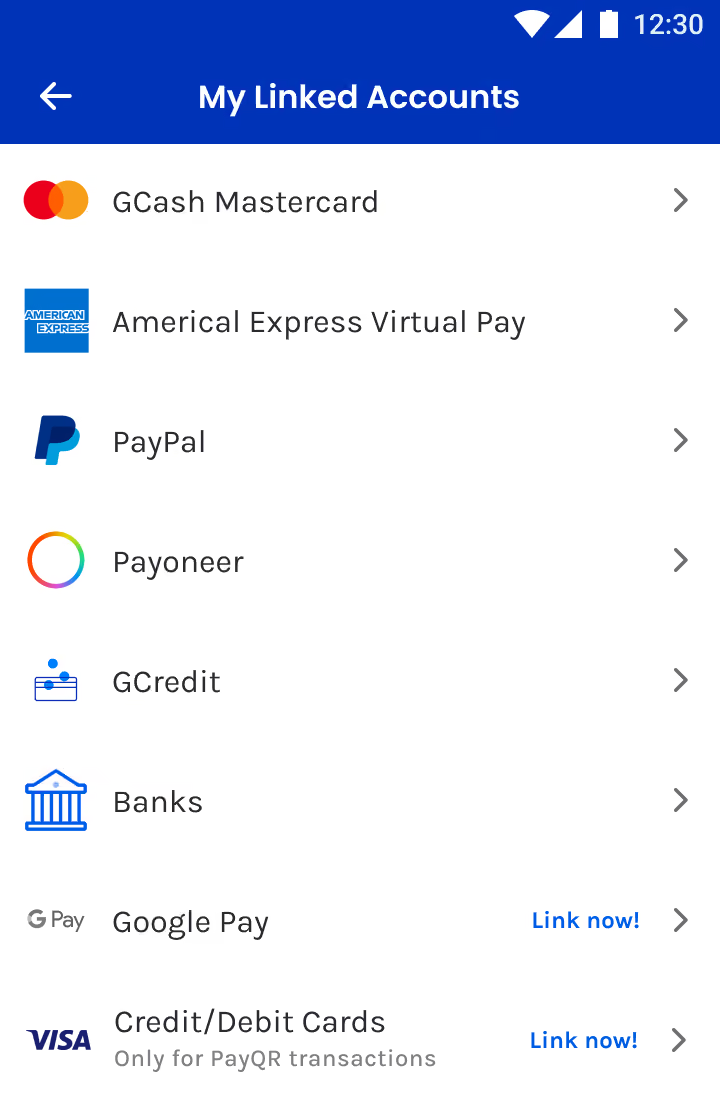
b.
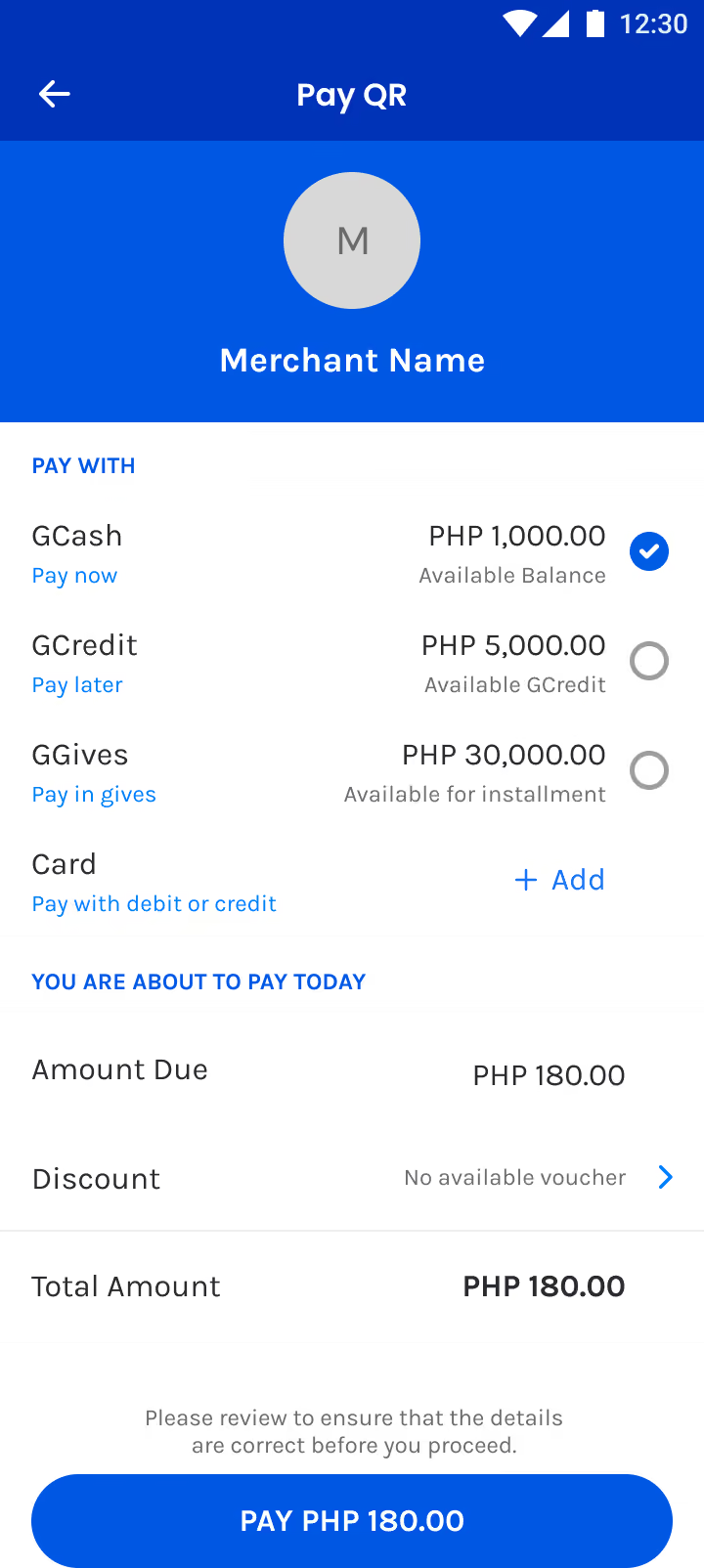
c.
- Is my credit/debit card secure when using this service?
Yes, your card is protected by the card network’s secure encryption technology, which helps keep your card details protected and prevents them from being shared during transactions. This provides an added layer of security when using your linked card. - How is my personal data handled for this Service?We handle your personal data using appropriate security measures and handle it in accordance with applicable privacy and data protection laws and regulations.
We handle your personal data using appropriate security measures and handle it in accordance with applicable privacy and data protection laws and regulations.
To provide this Service,, we may share certain information, such as your mobile number, name, and transaction details, with our trusted technology partners. We only share information necessary to support and enable the Service.
This sharing is necessary to:- Tokenize your card: Your card details are replaced with a secure token, helping protect your actual card number from being exposed during transactions.Verify your identity:
- Verify your identity: Your information may be used to perform 3D Secure (3DS) checks to verify that you are the one making the transaction and help prevent unauthorized or fraudulent transactions.
For more information on how we protect your data and your rights as a data subject by viewing our Privacy Notice here: https://gcash.com/privacy-notice.
- What is 3D Secure (3DS) and why is it used?3D Secure (3DS) is a security feature that provides an additional layer of protection for your transactions. When you link your card or make a payment, you may be asked to verify your identity,usually via an OTP sent by your issuing bank. This helps confirm that you are the cardholder and protects your card from unauthorized use.
3D Secure (3DS) is a security feature that provides an additional layer of protection for your transactions. When you link your card or make a payment, you may be asked to verify your identity,usually via an OTP sent by your issuing bank. This helps confirm that you are the cardholder and protects your card from unauthorized use. - Can I use both my GCash wallet and my linked card for the same transaction?No, you can only use one funding source per transaction, either your GCash wallet or your linked card. If you choose your linked card, it will be used for the full transaction amount.
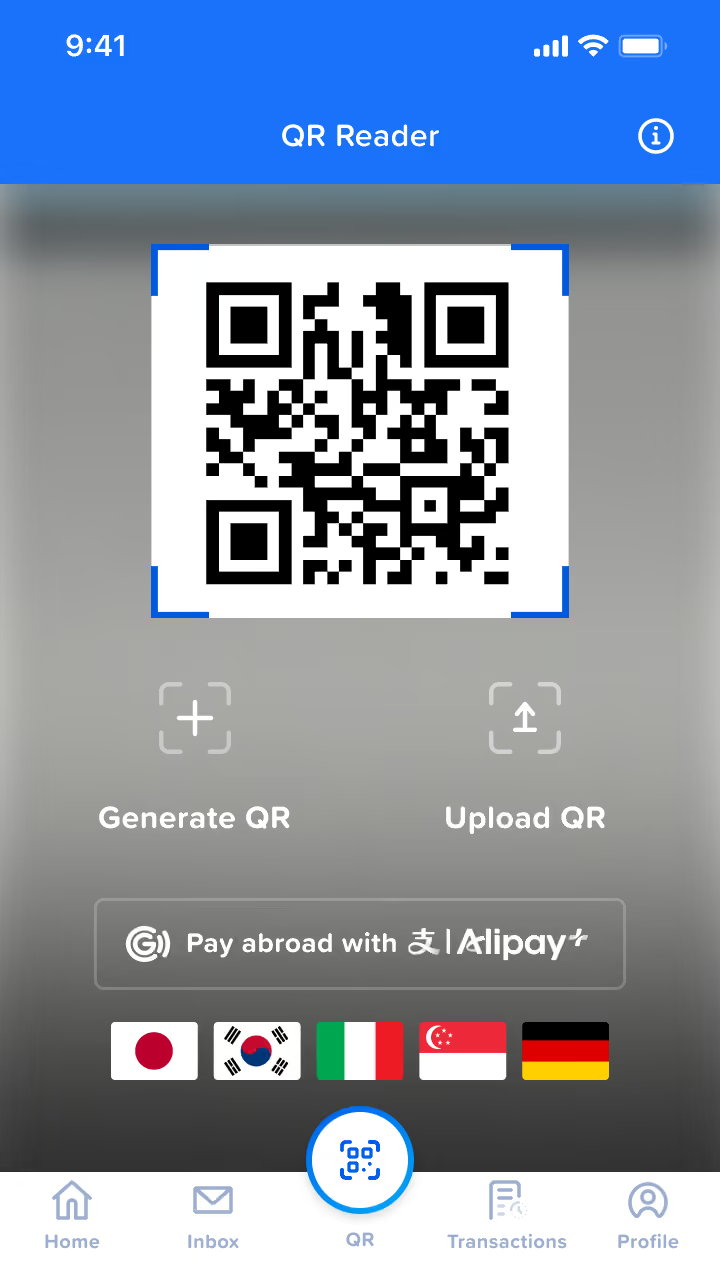
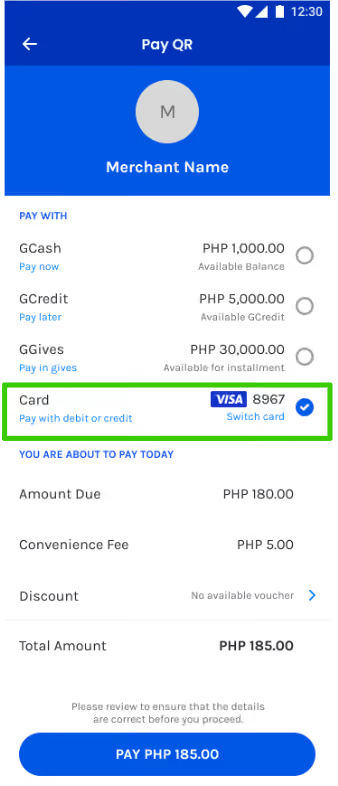
No, you can only use one funding source per transaction, either your GCash wallet or your linked card. If you choose your linked card, it will be used for the full transaction amount. - How do I make a payment using the Card Link service?Scan a QRPH code and choose your linked card as the source of funds. Ensure your card is set up in the app before proceeding.
Scan a QRPH code and choose your linked card as the source of funds. Ensure your card is set up in the app before proceeding.
- What happens if my GCash wallet balance is insufficient?
If your Gcash wallet balance is insufficient, you can still make a payment by selecting your linked card as the funding source. If you do not have a linked card, the payment cannot be completed. - Will my payment method automatically switch to my linked card if my GCash wallet balance is low?
Yes, Card Link Service will be selected by default.
- Can I use the Card Link Service for ATM withdrawals?
No, the Card Link Service is only available for payments to QRPH merchants. ATM withdrawals will always be deducted from your GCash wallet. - Can I use this Service internationally?
No. Currently, the Card Link service is limited to local QRPh transactions within the Philippines. - How do I unlink my credit/debit card from GCash?
You can unlink your card by going to the GCash App and following these steps:
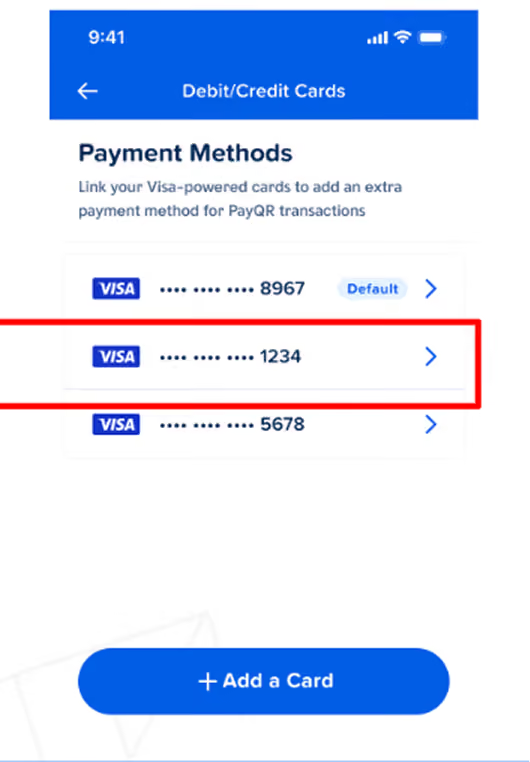
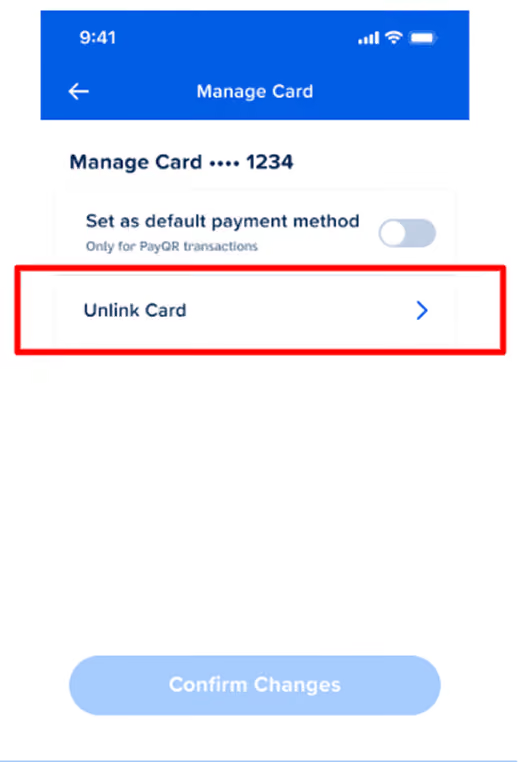
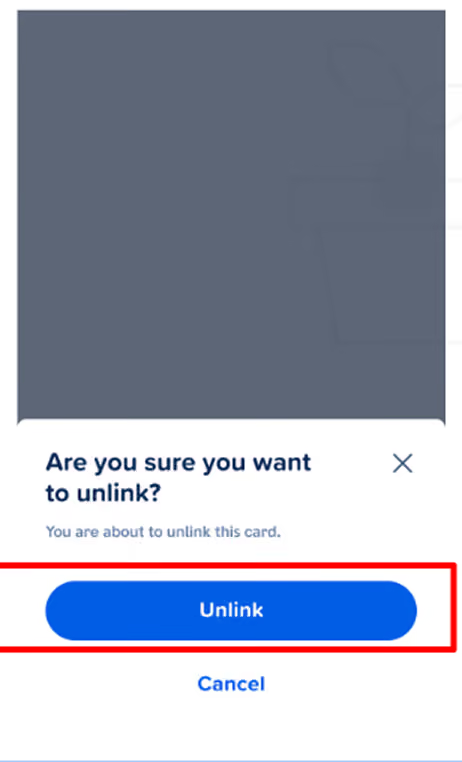
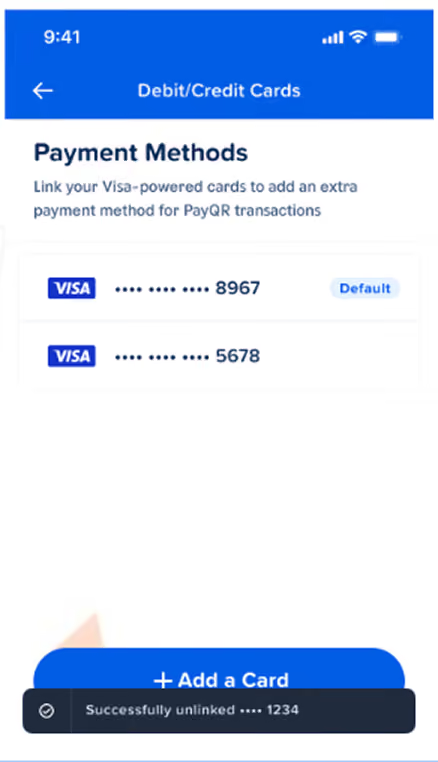
- What happens if my linked card is declined during a transaction?
If your linked card is declined, the transaction will not be processed. - How can I disable the Card Link service?
You can disable the Service by unlinking your credit/debit card from your GCash Wallet. - Who can I contact if I have issues or concerns?
For concerns regarding Card Link, please visit our GCash Help Center. - What should I do if I face a technical issue or transaction failure?
If you encounter any technical issues or transaction failures, please report them to GCash support within 7 days for assistance. GCash will work to resolve any issues promptly. - What will Card Link transactions look like on my credit card statement?
Card Link payments will appear as a single card transaction with GCash as the master merchant and the merchant name appended. For example: GCASH*Merchant XYZ 1500.00 - There are Card Link charges in my card statement that I don’t recognize. How do I dispute these charges?
If you identify Card Link charges on your card statement that you do not recognize, you must promptly notify your issuing bank and provide any supporting documentation so that the transactions may be investigated and, where applicable, disputed as duplicate or unauthorized charges. - Are there transaction limits when I pay with my linked card?
Yes. Card Link transactions follow existing GCash wallet and QRPH limits for fully verified (L3) users — there is no separate special limit just for Card Link - Are my card details shared with the merchant when I use the Card Link Service?
No. Your actual card number and sensitive card data are not shared with merchants. - What happens if I cancel a payment or a refund is issued?If a payment is cancelled or a refund is issued by the merchant, the corresponding credit or reversal will be posted to your account based on the processing timelines of the applicable card network and your issuing bank. if the credit is not posted within the applicable timeframe, you may contact your card issuer to request a dispute for non‑receipt of credit.
- How many cards can I link to Card Link?
You can link up to three (3) cards (credit, debit, or prepaid) to your GCash account for Card Link payments. Within the app you can set one default card for QRPH payments and switch to any other linked card at the QR cashier screen before paying. - What happens if card authorization fails but I see a deduction or pending amount?
If a card authorization fails but a deduction or pending amount appears on your account, such amount is expected to be automatically reversed or released following settlement and reconciliation, and if it is not, you may escalate the matter to your issuing bank for review and possible dispute as a processing error. - What other terms and conditions do I need to know when making purchase transactions using Card Link?
You shall continue to be bound by the terms and conditions of your card issuer and the GCash App Terms and Conditions.